Windows 8

Shutdown & Restart Windows 8 PC With a Right Click

Shutdown & Restart Windows 8 PC With a Right Click

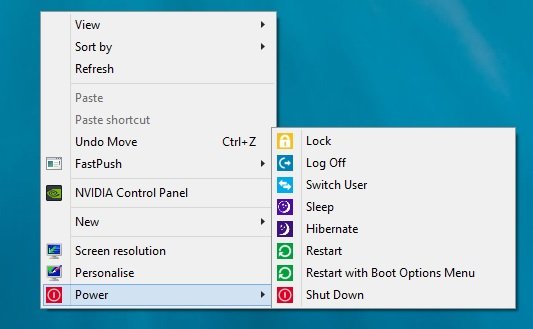
If you are using the Windows 8 OS, then you are aware with this fact that to shutdown windows 8 or restart is not so easy, to do this you have to go Windows Charms bar after that you can find power option on Windows 8. Such a long process to shutdown and restart windows [...]

Continue Reading »

Access Your Personal Folders & Application From My Computer – Windows Tip

Access Your Personal Folders & Application From My Computer – Windows Tip

To open you personal folder on your Windows, you have to go to the drive in which you created the folders and to run the application you have to find them on the program menu or add a shortcut on your desktop. The easiest way to access all your personal folder or application is to [...]

Continue Reading »

Clean Junk Files on PC and Speed Up the Performace

Clean Junk Files on PC and Speed Up the Performace

Your PC performance is depend on the space of your hard drive, if your Windows hard drive don’t have enough space or filled with lots of junk files, then you will face some speed issues with your PC. The best and easy way to improve the performance of your Windows PC is clean junk files [...]

Continue Reading »

Create Windows 8 Recovery Flash Drive to Troubleshoot Windows Problem

Create Windows 8 Recovery Flash Drive to Troubleshoot Windows Problem

If you are facing some problem on your Windows 8 PC and or you PC won’t start properly, a USB drive will help you to solve these problems. Yes you can do this easily with your USB drive by creating a recovery flash drive for your Windows 8 PC. Most of the Windows 8 user [...]

Continue Reading »

Translate Multiple Languages With Language Translation Windows 8 App

Translate Multiple Languages With Language Translation Windows 8 App

A lot of language translation online service are available on the net which helps you to translate multiple languages easily, Google translate is one of them. But today we found a new Windows 8 app Language Translation. Language Translation costs nothing and handy app that can take good care of all of your all your [...]

Continue Reading »

Turn Your Smartphone into Wireless Remote to Control PC

Turn Your Smartphone into Wireless Remote to Control PC

Do you know that you can turn your windows or Android smartphone into wireless remote to control your Windows PC. Yes with Unified Remote application you can use your smartphone as wireless keyboard, mouse, and control center, useful for controlling your PC from a distance. There are so many application which helps you turn your [...]

Continue Reading »

Record Windows 8 Screen in Gif Format With GifCam App

Record Windows 8 Screen in Gif Format With GifCam App

Few Months later we mentioned about some cool screen capture application for windows and 15 Free Screen Capture Apps for MAC, which allows you take the screen shot of desktop in some cool way and has some good features. Now today we  found a portable application which helps you to record your Windows screen in [...]

Continue Reading »

How to Setup Gmail, Outlook Mail Account In Windows 8

How to Setup Gmail, Outlook Mail Account In Windows 8

• • 0 Comments

Want to setup your Gmail or Outlook mail account in Windows 8? Below is the Guide which help you to setup your Gmail and Outlook mail account with Windows 8 Mail. In Windows 8, Microsoft replaced Outlook express with the Mail app. The best thing we like about the Windows 8 Mail app is its [...]

Continue Reading »

How to Create and Resize Partitions in Windows

How to Create and Resize Partitions in Windows

• • 0 Comments

Want to create a new partition on your Windows hard disk or resize any partition on your Windows 8, 7 or Vista PC. I know that its not a easy task to do, but with the help of good application you can create and resize partitions in Windows within a minute. EASEUS Partition Manager is [...]

Continue Reading »

6 Tips to Speed Up Windows 8 Boot Time

6 Tips to Speed Up Windows 8 Boot Time

No need to spend extra money on RAM to speed the Windows 8 Boot time or Windows 8 Startup time, you can do this easily with some tips ans tricks. All you have to make some changes on your Windows 8 PC such as stop unnecessary programs and services from running whenever you start your [...]

Continue Reading »

Back to Top