
Recently one of my friend contacted me and ask a question how to setup his email account in the mail application of Apple iPad. That’s not a difficult task but of most of the users don;’t know how to setup their email account in the iPad. So today here we are writing a simple and easy to follow guide which will help you to setup Email Account in Apple iPad, Before you can use your email account on iPad – you need to add your account to Mail. Follow the below mention step one by one on your new iPad ans set up your mail account within a few minutes.
Guide to Setup Mail in Ipad ansd iPhoneM
1. On the home-screen of your device hit Mail Icon to start the process.
2. Now form the given list select your account type which you want to setup on your device. Tap Other if your account is not listed.
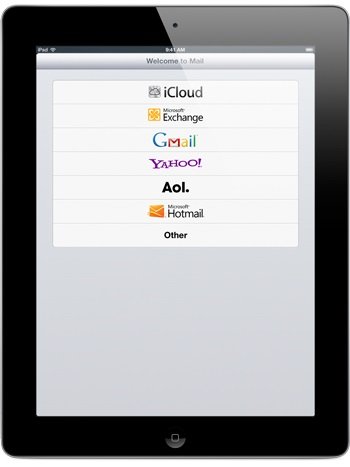
3. Now Enter your account information like username and password and tap Save. Mail configures most email accounts automatically so no need to enter other settings on your devcie.
4. Once your account information is saved – you can start sending and receiving email.
You can configure additional accounts by tapping Settings > Mail, Contacts, Calendars > Add Account
Check SMTP settings
1. Tap Settings > Mail, Contacts, Calendars. Under Accounts, tap the account from which you’re trying to send mail.
2. Under Outgoing Mail Server, tap SMTP.
3. Tap the SMTP server for your email account and verify the settings are correct.
4. If you have multiple email accounts on iPad, try using an SMTP server from another account. Tap the SMTP account and Select On on the On/Off slider.
You can follow us on twitter or join our facebook fanpage and Subscribe via Email to keep yourself updated on all the latest from Microsoft, Google, Apple and more.

quote: “enter you count information and tap save”
LOL epic fail
I dont know anything about this!!!!!!
Hi, I do think this is an excellent blog. I stumbledupon it 😉 I
may revisit once again since i have book-marked it. Money and freedom
is the best way to change, may you be rich and continue to help other people.