Top 6 Windows Spyware Scanners
Spyware is a type of malware that is installed on computers and collects information about users without their knowledge. The presence of spyware is typically hidden from the user. Typically, spyware is secretly installed on the user’s personal computer. Sometimes, however, spywares such as keyloggers are installed by the owner of a shared, corporate, or public computer on purpose in order to secretly monitor other users. Following are a selection of the best adware and spyware scanning tools to ferret out these often hidden menaces. If you go the standalone route, make sure you back it up with antivirus software and a firewall.
See Also: 10 best Free Online Virus Scanners
See Also: 12 Free Windows Antivirus of 2009
McAfee AntiSpyware 2006 is no longer sold as a standalone product, but don’t despair. McAfee VirusScan (2006) includes the same stellar protection. In our tests, both products nabbed 98% of running processes associated with adware and spyware, effectively neutering the infestation. At $39.99 for both stellar spyware protection and a top-notch virus scanner, McAfee VirusScan (2006) is a steal.
Windows Defender is offered free and, like CounterSpy, sports above average detection rates. The product is still considered beta and tech support is not provided. Despite these setbacks, it can provide a good second opinion. However, Microsoft AntiSpyware and CounterSpy should not be installed on the same system, as they both share common components.
Free for personal use, Spybot doesn’t have stellar removal rates. It does, however, provide TeaTimer and SDHelper which are extremely effective at preventing adware and spyware from gaining a foothold on your computer. So while you may not want to rely on it for detection and removal, you may want to install and activate it alongside other protection to help keep your system spyware-free.
Spy Sweeper removed 100% of the miscreant BHOs and Toolbars in our tests and stopped 84% of the active processes associated with adware and spyware. Spy Sweeper is a standalone spyware scanner and not a full-fledged Internet security suite, thus it is best used in conjunction with antivirus and firewall software.
5. Sunbelt CounterSpy
Sunbelt’s CounterSpy removed 90% of the miscreant Browser Helper Objects (BHOs) in our tests. Sporting above average detection for only $19.99, CounterSpy offers inexpensive protection, an easy-to-use interface and US-based tech support.
6. Hijack This
Another free utility, Hijack This isn’t a traditional spyware scanner. It will, however, provide a full report of what’s active on your system. Experienced users can peruse the report, identify the miscreants, and use Hijack This to disable the unwanted loading (or do so manually). Less experienced users can save the Hijack This log and send it to a more savvy friend for advice.
Microsoft Hotmail passwords leaked online
Microsoft confirms that thousands of Windows Live Hotmail account usernames and passwords have indeed leaked to the Internet as reported by Neowin.net. After learning of the breach, Microsoft “immediately requested that the credentials be removed and launched an investigation to determine the impact to customers,” Security experts say that if 10,000 passwords were lost, this would be a big attack, but not the biggest on record. Phishing schemes that have netted attackers 50,000 to 75,000 passwords have been recorded, especially when millions of potential accounts are available for attack.
WindowsLiveWire has a post up on the issue, and protecting yourself from phishing.
Download Free Kaspersky Internet Security 2010 Trail Ver
The Kaspersky Internet Security 2010 application was designed to be a all-in-one security solution that offers a worry-free computing environment for you and your family. Kaspersky Internet Security 2010 has everything you need for a safe and secure Internet experience. The new Kaspersky Internet Security 2010 currently are ready and available for downloading. Users who want to have a look at these programs and get free protection against viruses can download them via the link below.
Download Free Morro Microsoft Security Essentials
June 24, 2009 by Raj
Filed under Uncategorized
Microsoft will open up codename Morro, its upcoming free security solution designed to replace Windows Live OneCare 2.0, to the public. Microsoft Security Essentials Beta gives you high-quality protection against viruses and spyware, including Trojans, worms and other malicious software. And best of all, there are no costs or annoying subscriptions to keep track of.
Check Password Strenth with Microsoft password checker
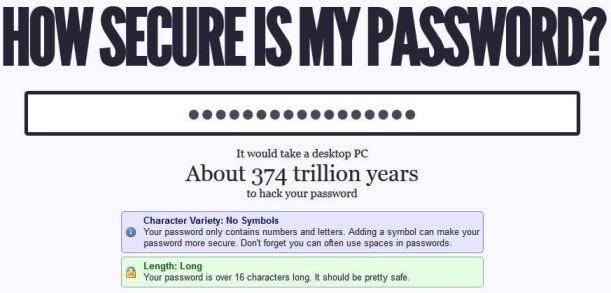
Some Months Back we Mentioned About how to Create a Strong Password which will help you to create Strong Passwords. A strong password should appear to be a random string of characters to an attacker. It should be 14 characters or longer, (eight characters or longer at a minimum). It should include a combination of uppercase and lowercase letters, numbers, and symbols.
Lock your PC with Mobile Bluetooth
Yes its Easy and Simple to do this you need a Free App Blue Lock and Bluetooth Enable Mobile Phone. Blue Lock PC is a software that automatically locks your PC by using your Bluetooth mobile phone as a key. When you leave the range of the signal (typically 10 m distance) it locks your PC. When you return your data is unlocked. No need to type passwords anymore.
Blue Lock PC offers several unique advantages for your pc security. Should you happen to lose your notebook pc, your information will remain locked. Blue Lock PC will protect valuable data from falling into the wrong hands.You need to install and establish this connection only once. From then on you are free from typing passwords each time you lock/unlock.
Scan Links for Harmful threats: Online Link Scan
April 8, 2009 by Raj
Filed under Antivirus, Security, Web services
Online Link Scan is new Web service which helps you to scan the link and give you the details of that Link is it safe or not for the surfing. This online tool offers safeguards by giving you the opportunity to scan each individual link, to see whether they are suspicious or not before putting your computer at risk.